Chapter 3: Build one for real · Lesson 7 of 7 · 8 min read
Finding the loop in any framework
Four searches that find the loop inside any agent framework, what frameworks really add, and when you need one.
The first lesson promised that once you'd seen the loop, frameworks would stop feeling like magic. Let's check that promise. Every agent framework has the loop from lesson 1 somewhere inside it, plus a long list of conveniences on top. This lesson shows you how to find the loop fast in any of them, and how to decide whether you need one at all.
Four searches that find the loop
Frameworks differ in style, but they all have to do the same four things. Each one leaves a trail you can search for.
| You're looking for | Search the source for | Lesson |
|---|---|---|
| Where it decides to stop | tool_calls, tool_use, stop_reason, finish_reason |
1 |
| Where tools are described | schema, parameters, description, the tool decorator |
2 |
| The step limit | max_turns, max_iterations, recursion_limit |
3 |
| Where history is kept | messages, history, session, checkpoint |
4 |
Start with the first row. The line that checks whether the model asked for a tool is lesson 1's if not reply.tool_calls, and the loop wraps around it.
To get the installed source in front of you:
pip show openai-agents | grep Location     # where the package lives
grep -rn "max_turns" /path/from/above/agents | head
Read the file the hits point at, not the docs. Docs describe what the authors intended. Source shows what actually runs.
Example: the loop as a graph
LangGraph is a good example because it looks least like a while loop. An agent there is a graph with two nodes, and the edges are the loop:
from langgraph.graph import StateGraph, MessagesState, START
from langgraph.prebuilt import ToolNode, tools_condition

graph = StateGraph(MessagesState)                     # state = the messages list
graph.add_node("model", call_model)                   # reply = call_model(messages)
graph.add_node("tools", ToolNode(tools))              # run the requested tools
graph.add_edge(START, "model")
graph.add_conditional_edges("model", tools_condition) # tool calls? go to "tools", else end
graph.add_edge("tools", "model")                      # ...and back: that's the loop
agent = graph.compile()
Line by line, it's lesson 1:
MessagesStateis themessageslist, with an append-only update rule.tools_conditionisif not reply.tool_calls: return.- The edge from
"tools"back to"model"iswhile True. - The step limit is a run setting,
recursion_limit, which stops the run with an error when it's exceeded: lesson 3's first brake. - Compile with a checkpointer and every step is saved under a thread ID, which is lesson 4's checkpoint.
interrupt()pauses a run for a human, which is lesson 3's approval.
LangChain's prebuilt agents build this same graph for you. You've just seen what's inside.
Same parts, different names
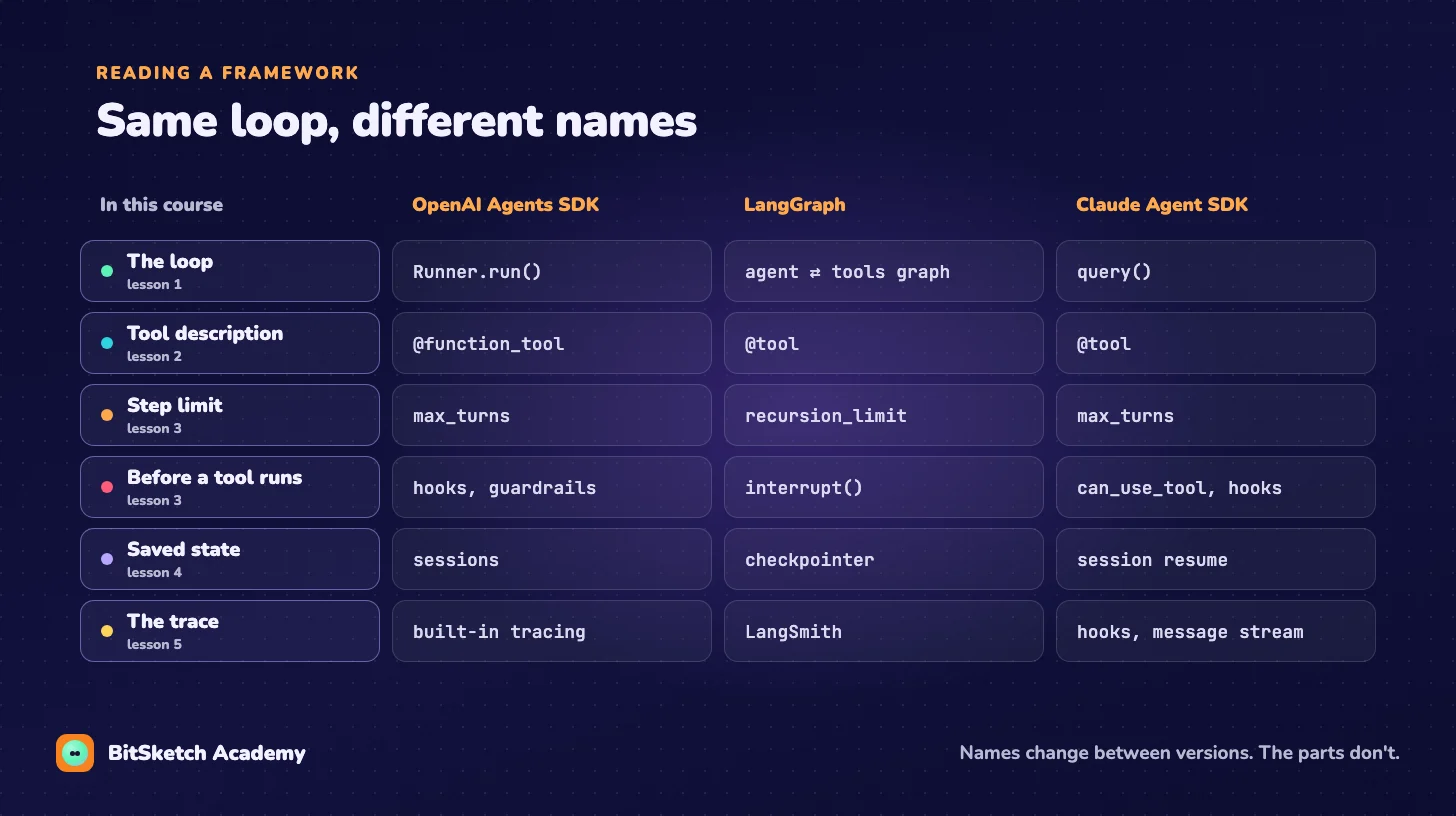
Once you read a framework this way, its docs get much shorter. Most pages describe one of the six rows above, with options.
What frameworks actually add
The loop is the small part. What you're really getting is everything around it:
| Feature | Why it's tedious to build yourself |
|---|---|
| Streaming | Showing tokens as they arrive, with tool calls arriving in pieces |
| Parallel tool calls | Running several requested tools at once, then reporting all results |
| Retries and rate limits | Backing off on API errors without losing the step |
| Many model providers | Each API shapes messages and tool calls differently |
| Tracing UI | Lesson 5's trace, with a viewer, search and sharing |
| Multi-agent handoffs | One agent passing the conversation to another |
Framework or 100 lines?
Use your own loop when the agent is small, you want to see every step, or you're learning. The project from lesson 6 is a real tool, and nothing in it needs a framework.
Reach for a framework when you need several items from the table above at once, especially streaming to a UI, multiple providers or a tracing UI for a team. Then pick the one whose source you can read comfortably, because sooner or later you'll be reading it during an outage.
Either way, you now know what to look for.
Where to go from here
That's the course. You've built the loop, given it tools, put brakes on it, managed its memory, debugged it from its trace, shipped a working agent and found the same loop inside the frameworks.
The video course Long-Running AI Agents picks up where this leaves off: context strategies for runs that last hours, durable execution, and guardrails around human approval.
Keep reading, free
Leave your email to unlock every lesson in our free text courses on this device. You'll also hear about new lessons and the video course launch.
You'll only hear from us when there's something new: a course, an ebook or a discount. Unsubscribe anytime. Privacy